


出てた。


SQLite Store, Document Storage の利用の他、ちょっとした Best Practices など(最適化、マイグレーションなど)。


|
Tweet |
出てた。
|
|
Tweet |
Appleから携帯電波環境でのアプリ開発のベスト・プラクティスが出てた。


|
|
Tweet |
出てた。

2013-09-18 新しいバックグラウンド実行モード、iOS 7で用いるアプリケーショ ンアイコンの寸法に関する情報を追加しました。


|
|
Tweet |
日本語版が出てた。iOS6アプリの外観をiOS7へ移行させる為の様々な情報が提供されている。


条件に応じてリソースをロードし分ける
if (floor(NSFoundationVersionNumber) <= NSFoundationVersionNumber_iOS_6_1) {
   // iOS 6.1以前に対応したリソースをロード
} else {
   // iOS 7以降に対応したリソースをロード
}
ジェスチャリコグナイザを利用する iOS 7が登場するまで、あるジェスチャリコグナイザが別のジェスチャリコグナイザの処理を抑制する必要がある場合、双方のオブジェクトの生成時に、requireGestureRecognizerToFail:を使って永続的な関係を設定しなければなりませんでした。この方式が成立するためには、アプリケーション(あるいはフレームワーク)の他の箇所でジェスチャリコグナイザを生成することがなく、したがって、稼働するジェスチャリコグナイザが入れ替わらないことが条件です。 iOS 7ではUIGestureRecognizerDelegateに2つのメソッドが追加されています。これにより、ジェスチャリコグナイザのデリゲートオブジェクトが、処理を抑制する(失敗させる)旨の要求を実行時に指定できるようになりました。 gestureRecognizer:gestureRecognizer shouldRequireFailureOfGestureRecognizer:otherGestureRecognizer gestureRecognizer:gestureRecognizer shouldBeRequiredToFailByGestureRecognizer:otherGestureRecognizer
Webビュー HTMLで記述したコンテンツを表示する領域です。 iOS 7では、UIWebViewにページ分割して表示できるようになりました。
|
|
Tweet |
出てた。Central/Peripheralそれぞれの処理、バックグラウンド処理、ベスト・プラクティスなどひと通りの説明があるようだ。

|
|
Tweet |
iOS Developer Library の Technical Q&Aに新着

A: Starting with iOS 6, the app store will automatically produce an update package for all new versions of apps submitted to the store. This package is optimized for updating an app from one version to another, and contains files that have changed between the prior version of an app and the new version of the app, excluding files that have not changed.(意訳)iOS6からは新バージョンに関してAppStore側でアップデート専用のパッケージを自動的に用意する。アップデート用パッケージはバージョン間の差分のみで、変更の無いものは含まれない。つまりユーザがアプリをアップデートする時には新バージョンで変更が入ったファイルだけのダウンロードで済むということらしい。
|
|
Tweet |
Appleからアプリ配布に関するドキュメントが公開されていた。


|
|
Tweet |
iOS6から出るようになったメッセージの意味がついに判明。デバッグログが残っていただけみたいだ。。

|
|
Tweet |


@property AVPlayer *player;
@property AVPlayerLayer *zoomPlayerLayer;
@property AVPlayerLayer *mainPlayerLayer;
mainPlayerLayer は通常の動画再生レイヤーで、zoomPlayerLayerがルーペ内の拡大された動画再生レイヤーになる。どちらも -[AVPlayerLayer playerLayerWithPlayer:] から取得した AVPlayerの動作再生レイヤー。このメソッドを使うと再生中の動画を複数のレイヤーで同時に表示することができる(って今回初めて知った)。この性質を利用して、zoomPlayerLayerに変形とマスクを適用することでループを表現している。
// Set up the zoom AVPlayerLayer.
self.zoomPlayerLayer = [AVPlayerLayer playerLayerWithPlayer:self.player];
CGSize zoomSize = CGSizeMake(self.view.layer.bounds.size.width * ZOOM_FACTOR,
 self.view.layer.bounds.size.height * ZOOM_FACTOR);
self.zoomPlayerLayer.frame = CGRectMake((contentLayer.bounds.size.width /2) - (zoomSize.width /2),
(contentLayer.bounds.size.height /2) - (zoomSize.height /2),zoomSize.width,zoomSize.height);

[contentLayer addSublayer:self.zoomPlayerLayer];
[self.loupeView.layer addSublayer:contentLayer];
// The content layer has a circular mask applied.
CAShapeLayer *maskLayer = [CAShapeLayer layer];
maskLayer.frame = contentLayer.bounds;

CGMutablePathRef circlePath = CGPathCreateMutable();
CGPathAddEllipseInRect(circlePath, NULL, CGRectInset(
self.loupeView.layer.bounds, LOUPE_BEZEL_WIDTH , LOUPE_BEZEL_WIDTH));

maskLayer.path = circlePath;
CGPathRelease(circlePath);
|
|
Tweet |
日本語訳が出ていた。


|
|
Tweet |
iOS Developer Library に Xcode、OS X、iOS ごとに利用可能なObjective-Cがまとめられている。
例えば ARC は Xcode4.2、iOS5から使えるが、zeroing は iOS4で使えないなど。
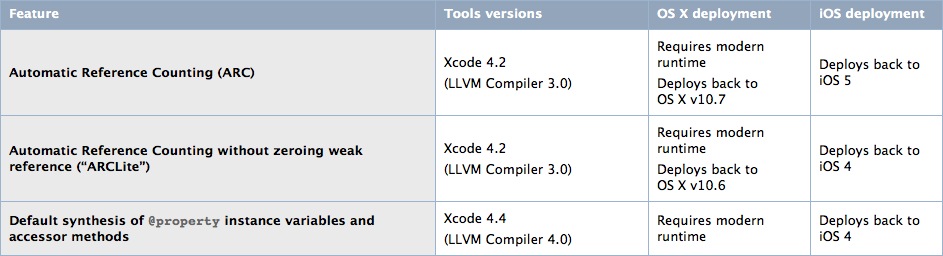
NSNumberリテラルなどは Xcode4.4以上なら OSを問わず使える(コンパイラの機能なのでそりゃそうだ)。

|
|
Tweet |
実行ファイル(バイナリ)には "build identifier" (UUID)が割り当てられているので、クラッシュレポート記載の IDと突き合わせることでクラッシュが起きたバージョンのバイナリを特定できる。その方法が書かれている。

$ dwarfdump --uuid Example.app/Example
UUID: 270A9B9D-7A33-3A4A-9F1A-AF8186F81394
  (armv7) Example.app/Example
|
|
Tweet |
Technical Q&A QA1764 より。
Xcodeでのビルド&実行は AppStore配布のバイナリと異なるし開発用環境での実行は Watchdog が無いなど同じ実機でも実行環境が異なる。このためユーザから報告を受けたバグが開発環境で再現しないということがまま起こる。環境の差異を解消する方法として "Archive"で ipa パッケージを作成し、iTunes経由でインストールする方法が紹介されている。

|
|
Tweet |
RSSによれば更新の他、3つのドキュメントが新たに日本語訳公開になったとのこと。


ファイルコーディネータとファイルプレゼンタに関する情報を追加 しました。iCloudにおけるファイル管理の説明もある(同期のアーキテクチャなど)。以下、目次
iCloudの情報のコピー、移動、削除を追加しました。 『セキュリティの概要 』で説明していた権限情報を追加し、また
各種の権限モデルの相互作用を示す概要を追加しました。
iCloudのファイル管理他にもファイルの非同期読み書き(GDC利用、OSX10.7以降、iOS不可)など興味深い説明あり。
- iCloudのドキュメントの保存と使い方
- iCloudストレージAPI
- iCloudのドキュメントの操作
- ドキュメントをiCloudストレージに移動
- iCloudのドキュメントの検索
- ファイルの版の食い違いの処理
- iCloudストレージの信頼性のある使い方
- iOSヒューマン インターフェイス ガイドライン
- iOSアプリケーションプログラミングガイド
- iOSツール ワークフ ローガイド
- App Storeでの公開に向けた開発
- 初めての iOS アプリケーション (旧題 iOSアプリケーションチュートリアル)
- In App Purchase プログラミングガイド
- iOS View Controller プログラミングガイド
- iOS ドキュメントベー ス アプリケーション プログラミングガイド

|
|
Tweet |
扱いが "Content Update" のものを紹介する。
ドキュメントの更新リスト(新しい順)
iOS Developer Library
更新分類は右側の日付の所に書いてあって次の種類がある。
 First Version
 Content Update
 Minor Change
First Version は一つ前の投稿で紹介したので参照されたい。
Reorganized tasks section to better reflect common usage. Substantial edits and rewrites to clarify specific behaviors, particularly for methods and properties added in iOS 5.
Added descriptions for APIs that support security-scoped bookmarks, used in apps that adopt App Sandbox.
Offers a complete list of help books for performing essential Instruments tasks.
Added descriptions for new entitlement keys added in Mac OS X v10.7.3.
Updated for Xcode 4.3.
Added descriptions for APIs that support security-scoped bookmarks, used in apps that adopt App Sandbox.
Updated the special considerations for the filter property to reflect the availability of Core Image in iOS 5.
|
|
Tweet |
大量のアップデートと共に新規公開もあったのでそれらを紹介する。
リリースノート。新規&更新ドキュメントの入り口としてまずはここを見るのがいい。新しく参入した開発者向けのドキュメントや Xcode4.3 へのリンクなどが記載されている。


